
Docker Swarm: the simpler side of container orchestration
Docker Swarm is king of a technology. While serving the same purpose as Kubernetes, it does not introduce the technical complexity Kubernetes does. Swarm mode turns a group of Docker Engines into a single cluster: managers hold the desired state through Raft consensus, workers run the containers, and Docker handles overlay networking and rolling updates. This makes it perfect for running on tiny hardware such as Raspberry Pis or outdated desktop PCs, as well as high-powered, multi-core servers.
This matters for workloads that need flexibility and portability, plus the scalability and high availability of an orchestrator, without being resource-hungry. Docker Swarm is a godsend for exactly such situations: it runs on affordable hardware, often extending the life of machines that would otherwise end up in landfill.
Is Docker Swarm still maintained?
A common objection is that Swarm is dead or deprecated. It is neither: Swarm mode ships in every current Docker Engine, still receives fixes, and is commercially supported by Mirantis. SwarmCLI’s 2026 status roundup collects the dated evidence and is candid about what Swarm does not do — no autoscaler, no custom resource model, no operator ecosystem.
What about k3s?
The usual objection is that k3s already fills this niche with a Kubernetes-compatible API. It does — but it still brings a control plane to run, an agent on every node and a vocabulary of objects to learn, where Swarm adds three concepts to the Docker Engine you already understand.
What a swarm buys you
After running the homelab for over 18 months now, I see great benefits for schools, NGOs, local government, small and medium businesses, etc. With current options for self-hosted applications, running a swarm provides enormous value at a fraction of the total cost of ownership (TCO). Examples include Paperless-ngx, Snipe-IT and n8n — I will cover those and others in more detail in future posts. The three machines cost nothing to acquire, since they were headed for scrap, and idling together at an estimated 40–60 W they draw roughly 350–525 kWh a year — about €90–130 at €0.25 per kWh.
Self-hosting is also a hedge against dependency. Every application that runs on the swarm reduces, and sometimes erases, a subscription somewhere — a Microsoft 365 seat, an Azure resource, an AWS service, a Google Cloud project. Each one is cheap to start, and that is exactly how they pile up unnoticed.
Reusing old hardware
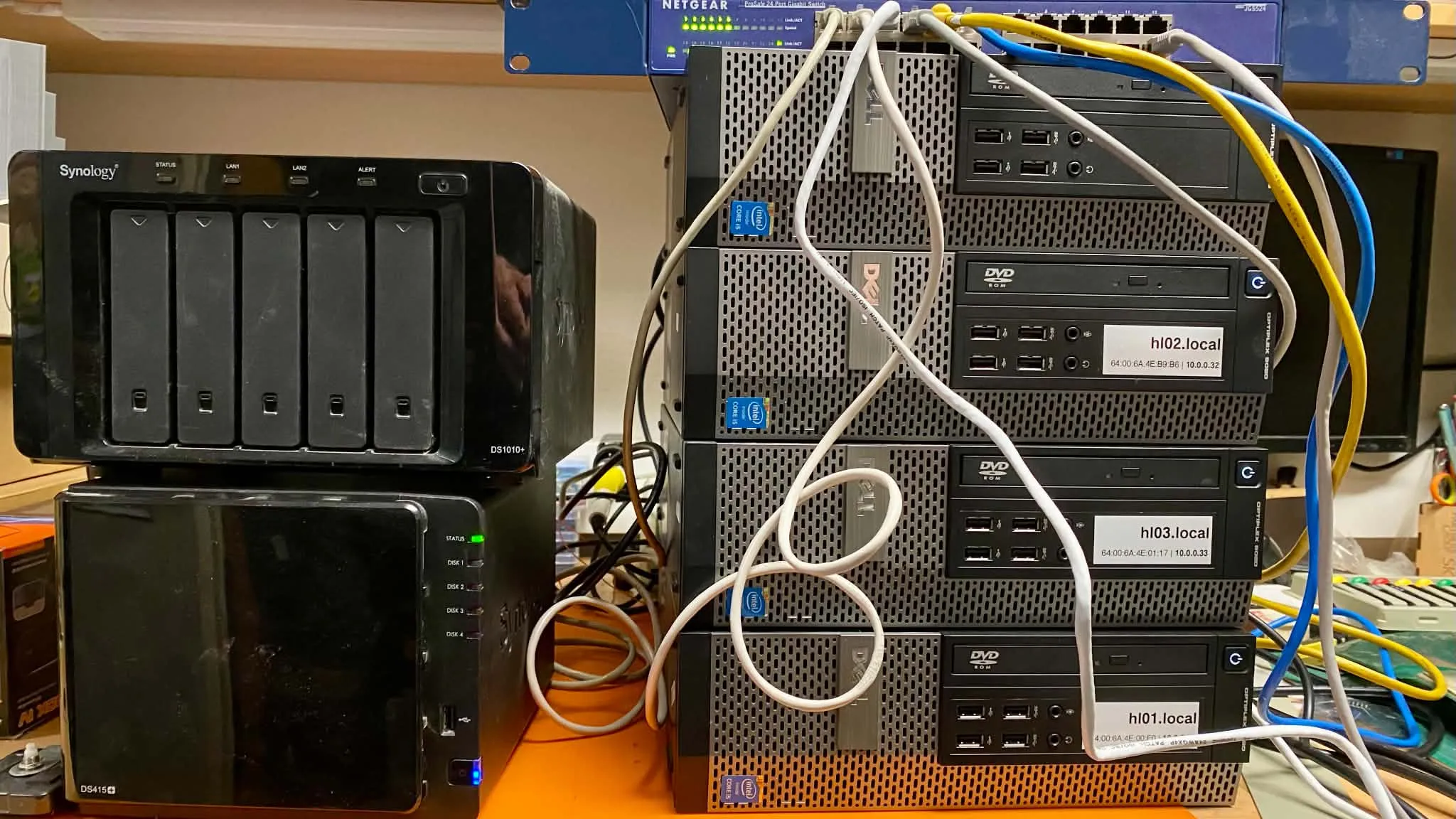
The homelab I run is exactly such a case: three outdated Dell OptiPlex desktops, each with an Intel Core i5, 16 GB of RAM and a 256 GB SSD — machines that would otherwise go unused. They are connected to a gigabit Netgear switch alongside a Synology NAS that provides NFS shares for the entire swarm. The NAS is the one piece here without redundancy, which is a subject for a later post. Each node runs Ubuntu 24.04 LTS, and all three are managers — the smallest odd number that keeps Raft quorum if one of them fails.
I built the homelab to dig deep into container orchestration and to educate myself on a new project I had got involved with. I enjoyed every bit of it, and still do. The path is rocky but very rewarding.
Provisioning with Ansible
I decided to use Ansible for automation, so I set up a dedicated project. It covers the initial provisioning:
- installing the NFS client and configuring mounts from the NAS
- installing Docker and configuring Docker Swarm
- setting up keepalived for a floating IP
- setting up NetBird VPN so I can connect to the swarm when not on the LAN
I do have some playbooks for ongoing maintenance, so I do not have to SSH into each node and run the entire flow manually.
Where Ansible stopped being enough
At first I also used Ansible to deploy containers, but it soon became too complicated to maintain. So I did some more research and tested a few options, none of which worked satisfactorily. That is why I started to entertain the idea of creating a tool that would do GitOps on Docker Swarm reliably and conveniently.
Now the homelab’s workloads run on a self-developed solution. Its desired state is entirely defined in Git, which keeps everything running smoothly.
None of this is exotic: three reused desktops, a gigabit switch, a NAS and an Ansible project. This is the first post in a series about the homelab, and the tool that now keeps its desired state in Git is the subject of the next one.