
Splitting compose files into reusable swarm services
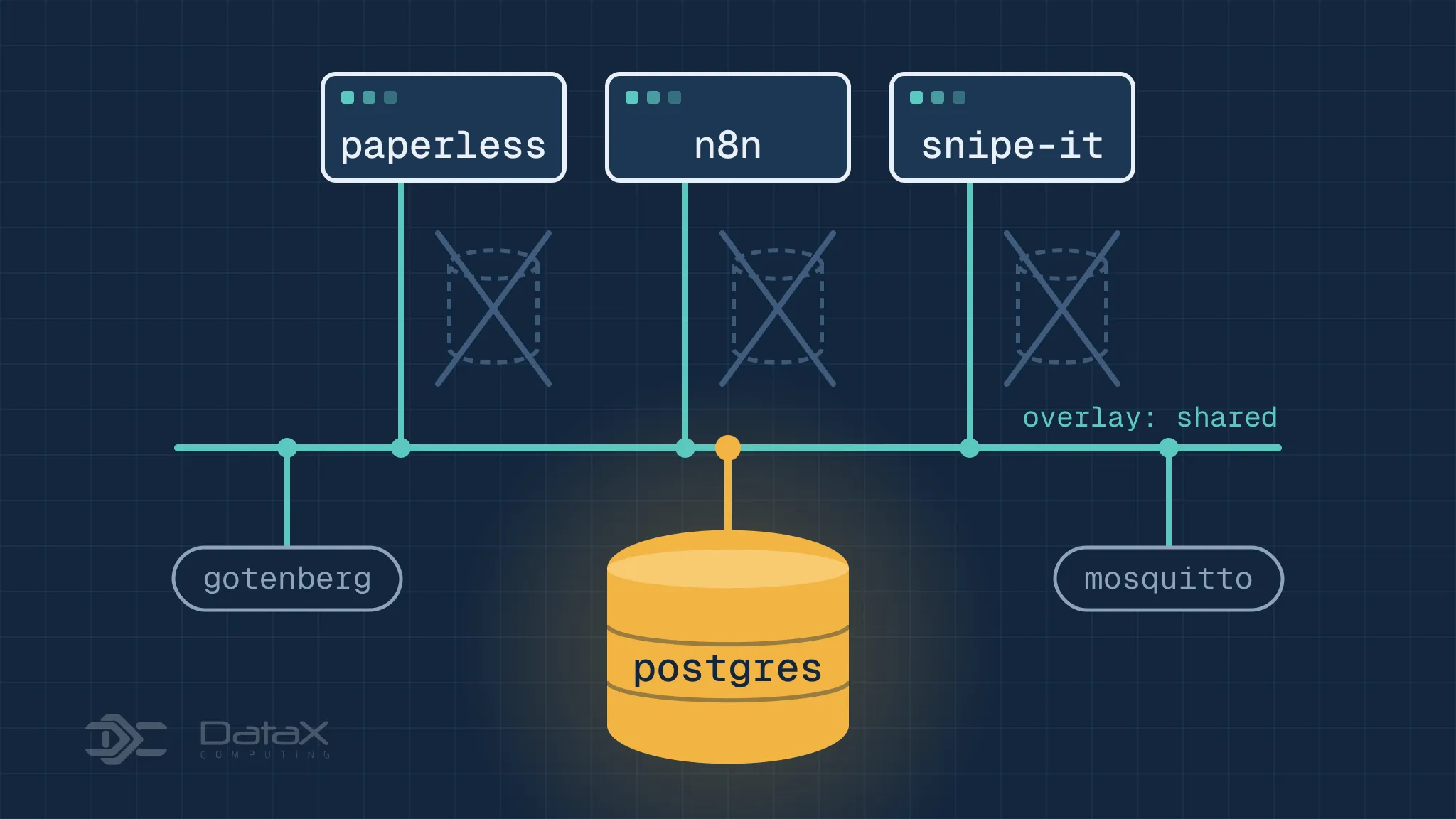
The previous post left the homelab running workloads whose desired state lives in Git. Almost every self-hosted application ships a compose file written for one machine: the application, its database, a Redis, often a document converter, all in one file. On a swarm that convenience becomes waste — each application brings its own Postgres, its own broker, its own converters.
The fix is not a bigger file. It is to split by role: stateful shared resources get their own stacks, applications get theirs, and one overlay network joins them. This post builds that split for Postgres, MariaDB, Gotenberg, Tika and Mosquitto, then runs Paperless-ngx and n8n against them.
Stacks cannot see each other
Every stack gets its own network, named after the stack. A stack called
paperless gets paperless_default, a stack called n8n gets n8n_default, and
service names resolve only inside their own network. That is why two stacks can
both run a service called postgres without colliding — and why neither can
reach the other’s database.
Sharing starts with one overlay network created outside any stack:
docker network create --driver overlay sharedEvery stack that needs a shared service declares it as external:
networks:
  shared:
    external: true
    name: shared
One caveat. Inside a stack, the short service name is registered as a DNS alias,
and on a shared network all of those aliases share one namespace. If two stacks
both run a service called postgres and both join shared, queries round-robin
between two unrelated databases. Shared services need names that are unique
across the whole cluster.
One stack for the databases
Postgres and MariaDB live together because they share a lifecycle and a storage model, and because one stack is easier to back up than two.
services:
  postgres:
    image: docker.io/library/postgres:18
    environment:
      POSTGRES_DB: paperless
      POSTGRES_USER: paperless
      POSTGRES_PASSWORD: change-me
    configs:
      - source: postgres_init
        target: /docker-entrypoint-initdb.d/10-databases.sql
    healthcheck:
      test: ["CMD-SHELL", "pg_isready -U $$POSTGRES_USER -d $$POSTGRES_DB"]
      interval: 10s
      timeout: 5s
      retries: 10
    volumes:
      - pgdata:/var/lib/postgresql
    networks:
      - shared
    deploy:
      replicas: 1
      update_config:
        order: stop-first
        failure_action: rollback
      restart_policy:
        condition: on-failure

  mariadb:
    image: docker.io/library/mariadb:11.8
    environment:
      MARIADB_DATABASE: snipeit
      MARIADB_USER: snipeit
      MARIADB_PASSWORD: change-me
      MARIADB_ROOT_PASSWORD: change-me
    volumes:
      - mariadbdata:/var/lib/mysql
    networks:
      - shared
    deploy:
      replicas: 1
      update_config:
        order: stop-first
        failure_action: rollback
      restart_policy:
        condition: on-failure

configs:
  postgres_init:
    file: ./postgres-init.sql

networks:
  shared:
    external: true
    name: shared

volumes:
  pgdata:
    driver: local
    driver_opts:
      type: nfs
      o: "addr=nas.example.lan,rw,nfsvers=4,proto=tcp,nolock"
      device: ":/export/swarm/postgres"
  mariadbdata:
    driver: local
    driver_opts:
      type: nfs
      o: "addr=nas.example.lan,rw,nfsvers=4,proto=tcp,nolock"
      device: ":/export/swarm/mariadb"
The second database is created once, on first start, when the data directory is still empty:
CREATE ROLE n8n LOGIN PASSWORD 'change-me';
CREATE DATABASE n8n OWNER n8n;
replicas: 1 is not a suggestion. Two tasks mounting the same data directory
corrupt it, and order: stop-first keeps a rolling update from briefly running
two writers. The healthcheck is there for operators, not for Swarm: nothing waits
on it.
Volumes point at NFS exports so a task can land on any node and still find its
data. A named volume with the default local driver lives on one node only — if
the database is rescheduled it starts with an empty directory, which looks
exactly like data loss. nolock lets the client do its locking locally instead
of asking the server’s lock manager; that is also why replicas have to stay at
one, since two nodes writing the same directory would not see each other’s
locks. Two things to verify on the NAS: the export needs no_root_squash, and
the container uids — 999 for Postgres, 999 for MariaDB — must be able to write
it. Otherwise the service restarts forever on permission errors.
Postgres 18 moved PGDATA to /var/lib/postgresql/18/docker and its declared
volume to /var/lib/postgresql. Mounting the old /var/lib/postgresql/data
path leaves the actual data outside the volume.
Shared document converters
Gotenberg and Tika are stateless: nothing to persist, nothing to schedule, nothing that cares who calls them. They get replicas and no published ports.
services:
  gotenberg:
    image: docker.io/gotenberg/gotenberg:8.37
    command:
      - gotenberg
      - --chromium-disable-javascript=true
      - --chromium-allow-list=file:///tmp/.*
    networks:
      - shared
    deploy:
      replicas: 2
      restart_policy:
        condition: on-failure

  tika:
    image: docker.io/apache/tika:3.3.1.0
    networks:
      - shared
    deploy:
      replicas: 1
      restart_policy:
        condition: on-failure

networks:
  shared:
    external: true
    name: shared
Nothing is published. The swarm keeps an internal VIP per service and balances
across the replicas, so http://gotenberg:3000 reaches both tasks without the
routing mesh being involved.
Shared MQTT broker
Mosquitto needs a config file and a password file. The config belongs in a swarm config, the password file in a secret:
docker run --rm -it --user "$(id -u):$(id -g)" -v "$PWD:/work" \
  docker.io/library/eclipse-mosquitto:2.1.2-alpine \
  mosquitto_passwd -c -b /work/mqtt.passwd mqtt 'a-long-password'
docker secret create mosquitto_passwd ./mqtt.passwdservices:
mosquitto:
image: docker.io/library/eclipse-mosquitto:2.1.2-alpine
configs:
- source: mosquitto_conf
target: /mosquitto/config/mosquitto.conf
secrets:
- mosquitto_passwd
volumes:
- data:/mosquitto/data
networks:
- shared
ports:
- target: 1883
published: 1883
- target: 9001
published: 9001
deploy:
replicas: 1
restart_policy:
condition: on-failure
configs:
mosquitto_conf:
file: ./mosquitto.conf
secrets:
mosquitto_passwd:
external: true
networks:
shared:
external: true
name: shared
volumes:
data:
driver: local
driver_opts:
type: nfs
o: "addr=nas.example.lan,rw,nfsvers=4,proto=tcp,nolock"
device: ":/export/swarm/mosquitto"listener 1883
protocol mqtt
listener 9001
protocol websockets
allow_anonymous false
password_file /run/secrets/mosquitto_passwd
persistence true
persistence_location /mosquitto/data/Configs and secrets are immutable in Swarm: edit mosquitto.conf, redeploy the
same stack, and it fails with “config already exists”. The config needs a new
name, or has to be removed first.
Using them from Paperless
With the shared pieces in place, the application file loses its database, both converters and the last of its host paths:
services:
  webserver:
    image: ghcr.io/paperless-ngx/paperless-ngx:3.3.4
    environment:
      PAPERLESS_REDIS: redis://broker:6379
      PAPERLESS_DBHOST: postgres
      PAPERLESS_DBNAME: paperless
      PAPERLESS_DBUSER: paperless
      PAPERLESS_DBPASS: change-me
      PAPERLESS_TIKA_ENABLED: 1
      PAPERLESS_TIKA_GOTENBERG_ENDPOINT: http://gotenberg:3000
      PAPERLESS_TIKA_ENDPOINT: http://tika:9998
    volumes:
      - data:/usr/src/paperless/data
      - media:/usr/src/paperless/media
      - consume:/usr/src/paperless/consume
      - export:/usr/src/paperless/export
    networks:
      - default
      - shared
    ports:
      - target: 8000
        published: 8000
    deploy:
      replicas: 1
      restart_policy:
        condition: on-failure

  broker:
    image: docker.io/valkey/valkey:9-alpine
    volumes:
      - broker:/data
    networks:
      - default
    deploy:
      replicas: 1
      restart_policy:
        condition: on-failure

networks:
  default:
  shared:
    external: true
    name: shared

volumes:
  data:
    driver: local
    driver_opts:
      type: nfs
      o: "addr=nas.example.lan,rw,nfsvers=4,proto=tcp,nolock"
      device: ":/export/swarm/paperless/data"
  media:
    driver: local
    driver_opts:
      type: nfs
      o: "addr=nas.example.lan,rw,nfsvers=4,proto=tcp,nolock"
      device: ":/export/swarm/paperless/media"
  consume:
    driver: local
    driver_opts:
      type: nfs
      o: "addr=nas.example.lan,rw,nfsvers=4,proto=tcp,nolock"
      device: ":/export/swarm/paperless/consume"
  export:
    driver: local
    driver_opts:
      type: nfs
      o: "addr=nas.example.lan,rw,nfsvers=4,proto=tcp,nolock"
      device: ":/export/swarm/paperless/export"
  broker:
    driver: local
    driver_opts:
      type: nfs
      o: "addr=nas.example.lan,rw,nfsvers=4,proto=tcp,nolock"
      device: ":/export/swarm/paperless/broker"
The broker stays in this stack. It is Paperless’s work queue, not a shared
service, and nothing else has any business reading it. The database and both
converters are resolved by name over shared, and because the volumes are NFS
exports, scan folders and exports are just directories on the NAS that you can
drop files into from any machine.
Using them from n8n
Same idea, with Postgres and the runners:
services:
  n8n:
    image: docker.n8n.io/n8nio/n8n:2.44.7
    environment:
      DB_TYPE: postgresdb
      DB_POSTGRESDB_HOST: postgres
      DB_POSTGRESDB_PORT: 5432
      DB_POSTGRESDB_DATABASE: n8n
      DB_POSTGRESDB_USER: n8n
      DB_POSTGRESDB_PASSWORD: change-me
      N8N_RUNNERS_MODE: external
      N8N_RUNNERS_AUTH_TOKEN: change-me
      N8N_RUNNERS_BROKER_LISTEN_ADDRESS: 0.0.0.0
    volumes:
      - data:/home/node/.n8n
    networks:
      - default
      - shared
    ports:
      - target: 5678
        published: 5678
    deploy:
      replicas: 1
      restart_policy:
        condition: on-failure

  runner:
    image: docker.io/n8nio/runners:2.44.7
    environment:
      N8N_RUNNERS_AUTH_TOKEN: change-me
      N8N_RUNNERS_TASK_BROKER_URI: http://n8n:5679
    networks:
      - default
    deploy:
      replicas: 2
      restart_policy:
        condition: on-failure

networks:
  default:
  shared:
    external: true
    name: shared

volumes:
  data:
    driver: local
    driver_opts:
      type: nfs
      o: "addr=nas.example.lan,rw,nfsvers=4,proto=tcp,nolock"
      device: ":/export/swarm/n8n"
The n8n data volume is not optional even though the database is external: it holds the encryption key that decrypts every stored credential. Lose it and the workflows still run, with credentials nobody can read.
Backups
One backup service covers every database instead of a sidecar per application. GoBackup reads a config mounted as a swarm config and runs on a schedule:
services:
  gobackup:
    image: huacnlee/gobackup:v3.1.1
    configs:
      - source: gobackup_yml
        target: /etc/gobackup/gobackup.yml
    environment:
      POSTGRES_PASSWORD: change-me
      MARIADB_ROOT_PASSWORD: change-me
    volumes:
      - backups:/root/backups
    networks:
      - shared
    deploy:
      replicas: 1
      restart_policy:
        condition: on-failure

configs:
  gobackup_yml:
    file: ./gobackup.yml

networks:
  shared:
    external: true
    name: shared

volumes:
  backups:
    driver: local
    driver_opts:
      type: nfs
      o: "addr=nas.example.lan,rw,nfsvers=4,proto=tcp,nolock"
device: ":/export/swarm/backups"models:
databases:
schedule:
every: "1day"
at: "02:30"
compress_with:
type: tgz
storages:
nas:
type: local
keep: 14
path: /root/backups
databases:
paperless:
type: postgresql
host: postgres
port: 5432
database: paperless
username: paperless
password: $POSTGRES_PASSWORD
snipeit:
type: mysql
host: mariadb
port: 3306
database: snipeit
username: root
password: $MARIADB_ROOT_PASSWORD$POSTGRES_PASSWORD there is expanded by GoBackup from the service environment,
not by Compose, because the config file is mounted at runtime. Compose would have
required ${POSTGRES_PASSWORD} and a shell variable at deploy time.
Deploying it
docker network create --driver overlay shared
docker stack deploy -c databases.yml databases
docker stack deploy -c documents.yml documents
docker stack deploy -c mosquitto.yml mqtt
docker stack deploy -c paperless.yml paperless
docker stack deploy -c n8n.yml n8n
docker stack deploy -c backup.yml backup
The order matters only in that the shared network has to exist first and the
shared services should be running before the applications call them. Nothing in
Swarm enforces either — depends_on does not survive deployment, which is the
subject of the next post.
What this costs
This is not the default answer, and it is not right for every situation. Putting
a database on NFS turns the NAS into the database’s disk: a NAS outage stops
every application that depends on it, and the export has to run with synchronous
writes or fsync is a promise the server does not keep. One Postgres for many
applications also means one upgrade window and one failure domain — a
docker service update on it is a maintenance announcement, not a routine
deploy.
The trade is deliberate: a swarm built from scrap hardware is short on memory and CPU, not on applications. In that situation one carefully run database beats five neglected ones. When the goal is a complete setup for one customer or a disposable test environment, the self-contained stack is still the better answer.